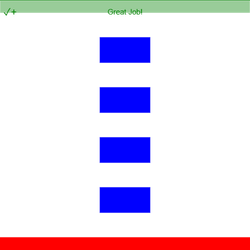
STEP 4: Using a loop, we can make a road at each y-coordinate stored in my_list.
The looping code for value in my_list will repeat once for each item in our list! We can make a road each time.
- Go to the GRAPHICS tab, and from drag out Rectangle inside the loop.
- Make sure the rectangle code is indented once. One indent ····¬ is 4 spaces or 1 tab!
- Change the rectangle's y-value from 0 to value. This variable holds a new value each time the loop repeats!
To navigate the page using the TAB key, first press ESC to exit the code editor.
# sprite = codesters.Rectangle(x, y, width, height, "color")
start = codesters.Rectangle(0, -250, 500, 50, "red")
# sprite = codesters.Rectangle(x, y, width, height, "color")
finish = codesters.Rectangle(0, 250, 500, 50, "green")
my_list = [-150, -50, 50, 150]
for value in my_list:
pass # delete after adding indented code
# add code here


